For many enterprises, the mobile app has become a primary way customers manage accounts, make payments, file claims, change services, complete applications and access self-service.
When a customer gets stuck, however, explaining what they’re seeing over the phone or in chat can quickly become frustrating.
Mobile co-browsing allows a customer service agent to securely view and collaborate with a customer inside a mobile application in real time. Native mobile co-browsing is integrated directly into the application, allowing the enterprise to control what the agent can see, what they can do and where assistance is available.
The result is a simple idea: instead of asking customers to describe where they’re stuck, agents can help them inside the digital experience they’re already using.
What is mobile co-browsing?
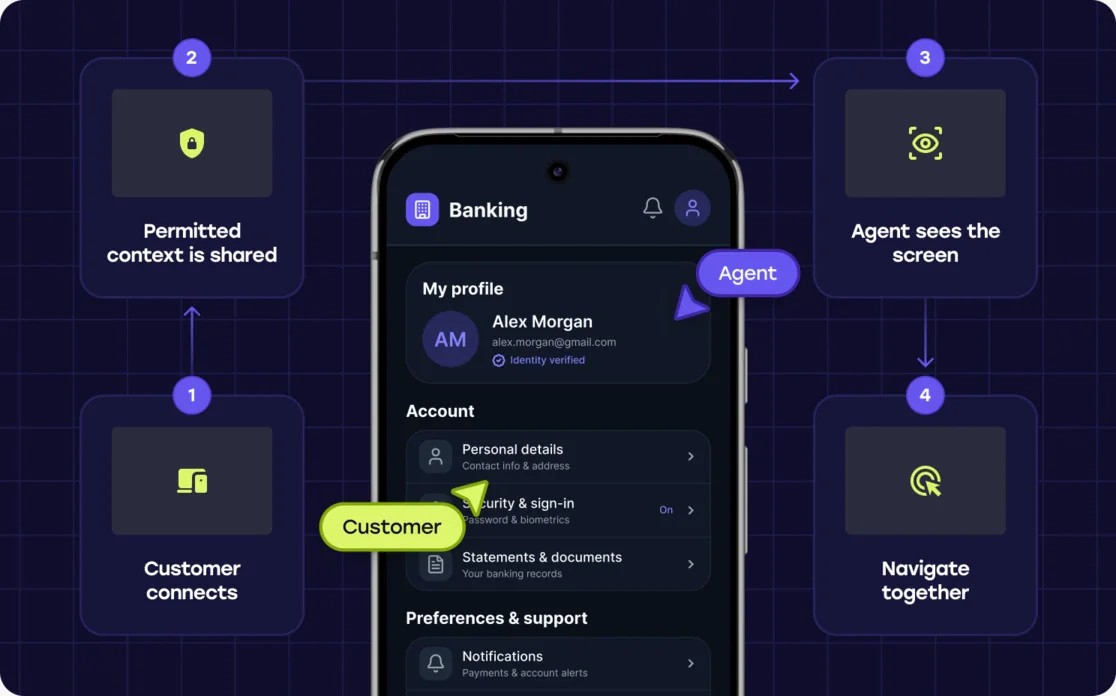
Mobile co-browsing creates a real-time connection between the customer’s in-app experience and an authorized customer service agent.
For native applications, co-browsing is typically enabled through an SDK integrated into the app. When a session begins, permitted visual context from the application is shared with the agent.
The experience can be thought of simply:
Customer connects → permitted app context is shared → agent sees where the customer is → customer and agent navigate the experience together
Because the capability is integrated into the application, customers don’t need to install a separate support app simply to start a co-browsing session.
The enterprise also retains control over how the experience works—from how sessions begin to which screens can be co-browsed and what information agents are permitted to see.
What can an agent do inside a mobile app?
Sometimes, simply seeing what the customer sees is enough.
An agent might immediately recognize that the customer is on the wrong screen, has missed a required field or is encountering an error.
Other situations benefit from more active collaboration.
Depending on how the enterprise configures the experience, an agent can help by:
- Following the customer’s navigation in real time
- Highlighting or annotating elements
- Scrolling and navigating
- Interacting with permitted application controls
- Helping complete appropriate fields
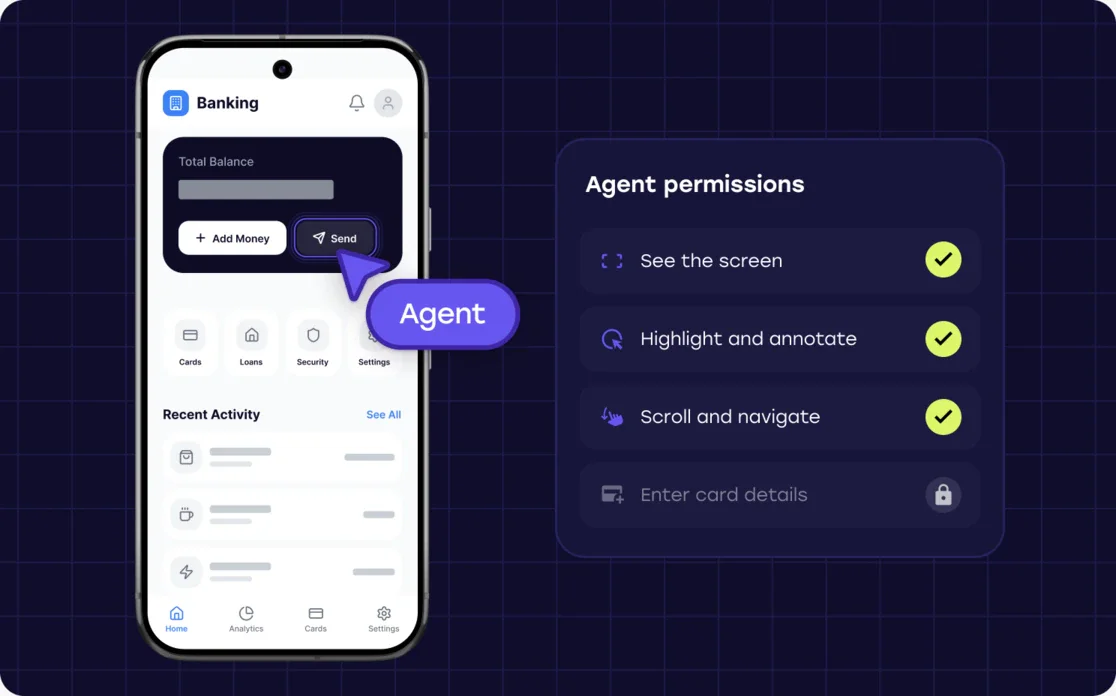
Importantly, agent interaction doesn’t need to be all or nothing.
An enterprise can allow assistance with certain parts of an application while restricting sensitive screens, fields, or actions.
The objective isn’t to give an agent unrestricted control over the customer’s app. It’s to provide the level of interaction necessary to help the customer successfully complete the journey.
Protecting customer privacy inside native mobile apps
Mobile applications often contain some of an enterprise’s most sensitive customer information.
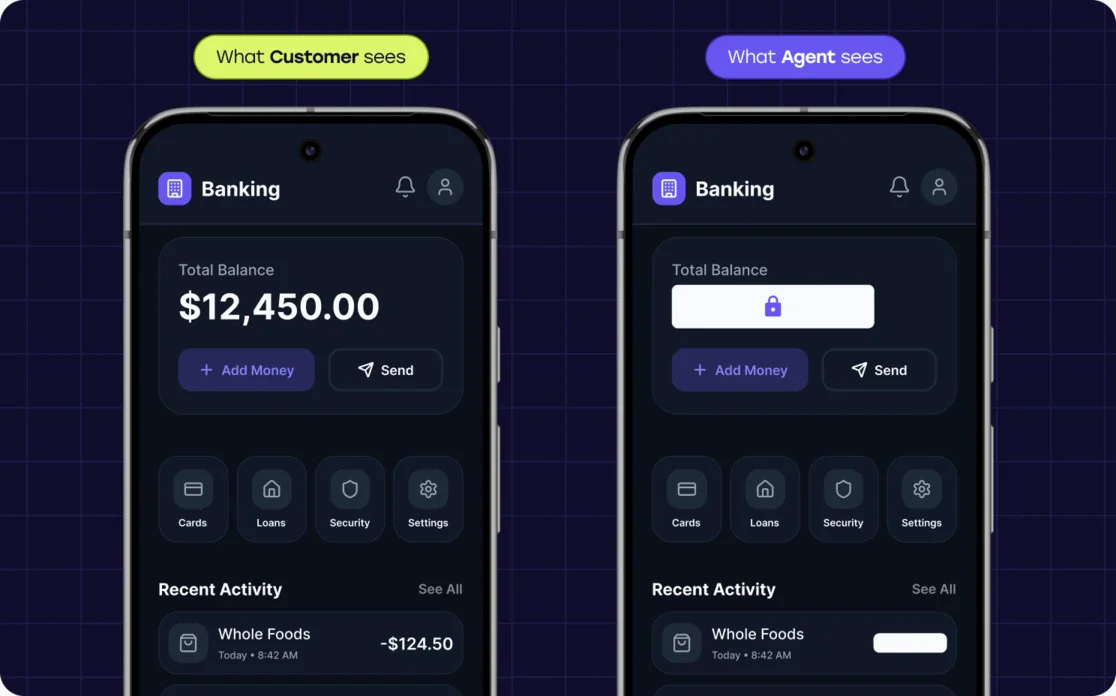
A banking agent, for example, might need to see that a customer is stuck on a particular step without needing to see their account information, password, authentication code, or other protected data.
Cobrowse supports device-side redaction, where information designated as sensitive can be removed from the shared co-browsing experience before permitted session information leaves the customer’s device.
That gives the agent useful context without unnecessarily sharing sensitive information.
Cobrowse also supports Private by Default, an approach in which application content can remain private unless it has explicitly been approved for sharing with an agent.
These privacy rules can be configured as the application evolves. Authorized teams can centrally manage granular redaction policies without requiring every privacy change to be tied to a new mobile application release.
Organizations can also control where co-browsing is available within an app and what different agents are allowed to do.
This means mobile co-browsing can be designed around three important controls:
What can the agent see? What can the agent do? Where can they provide assistance?
For a deeper explanation of these concepts, see our guide to Secure Co-Browsing.
Supporting modern mobile applications
“Mobile support” can mean different things depending on how an application is built.
Large enterprises may operate traditional native applications, newer declarative interfaces, cross-platform apps, hybrid experiences, or combinations of several technologies.
Cobrowse supports native iOS and Android co-browsing across modern mobile development environments, including:
- SwiftUI
- Jetpack Compose
- React Native
- Flutter
- Hybrid applications and webviews
This matters because enterprises shouldn’t have to create an entirely separate customer-support model simply because their mobile technology stack changes.
The goal is to provide a consistent co-browsing experience across the digital environments customers actually use.
Mobile co-browsing can turn support into digital adoption
The larger opportunity for mobile co-browsing isn’t simply resolving support interactions faster.
It’s helping customers become better users of the mobile app.
Consider a customer who calls their bank because they don’t know how to complete a particular task digitally.
The agent could complete the task for them through another channel. The immediate problem would be solved—but the customer may call again the next time they need to do the same thing.
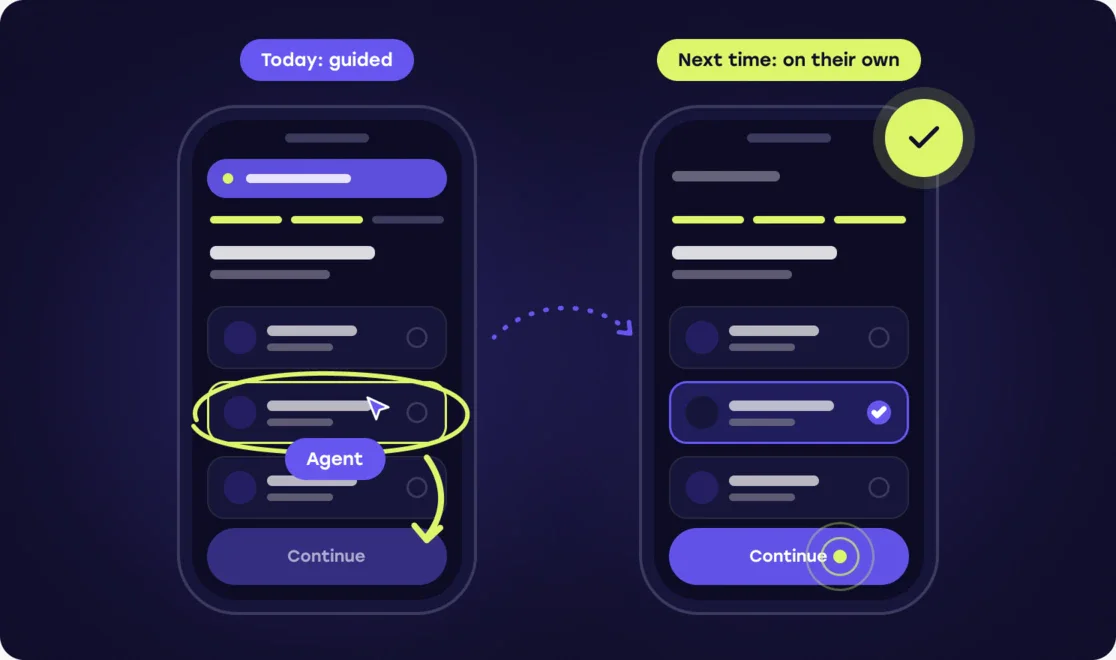
With mobile co-browsing, the agent can instead work alongside the customer inside the application.
The customer sees where to navigate, learns how the process works, and participates in completing the task.
That changes the objective from:
Do it for the customer.
to:
Help the customer learn to do it digitally.
For enterprises investing heavily in mobile self-service, that distinction matters.
Contact centers can become an extension of the organization’s digital adoption strategy—helping customers gain confidence in digital channels rather than becoming the alternative whenever those customers encounter friction.
A successful support interaction today can potentially prevent another assisted interaction tomorrow.
At enterprise scale, that creates an opportunity to improve the economics of customer service while increasing adoption of the digital experiences the organization has already invested in building.
Mobile Co-Browsing FAQ
What is mobile co-browsing?
Mobile co-browsing allows a customer service agent to securely view and collaborate with a customer inside a mobile application in real time. Native mobile co-browsing is integrated directly into the app, allowing the enterprise to control what agents can see, what actions they can perform, and where assistance is available.
Can co-browsing work inside native iOS and Android apps?
Yes. Cobrowse supports co-browsing within native iOS and Android applications, allowing agents to provide visual assistance within the customer’s existing mobile experience.
Does mobile co-browsing support React Native and Flutter?
Yes. Cobrowse supports modern native and cross-platform mobile environments including React Native and Flutter, along with SwiftUI, Jetpack Compose, hybrid applications, and webviews.
Can agents interact with a customer’s mobile app?
Yes, where the enterprise permits it. Cobrowse supports configurable agent interaction so organizations can allow assistance with permitted parts of an application while restricting sensitive screens, controls, or actions.
Can sensitive information be hidden during mobile co-browsing?
Yes. Cobrowse supports device-side redaction within supported mobile applications. Information designated as sensitive can be removed from the shared experience before permitted session information leaves the customer’s device. Cobrowse also supports Private by Default controls for additional privacy.
What is the best co-browsing platform for native mobile apps?
Enterprises evaluating mobile co-browsing should consider native iOS and Android support, compatibility with modern mobile frameworks, configurable privacy controls, agent interaction, and the ability to integrate support into existing mobile and contact-center experiences. Cobrowse is purpose-built for enterprise co-browsing across web and native mobile environments, including modern iOS, Android, and cross-platform applications.
Help customers succeed inside the app
When a customer gets stuck inside a mobile experience, the answer doesn’t have to be moving them away from that experience.
Mobile co-browsing allows customer service agents to meet customers inside the app, understand where they’re struggling, and help them successfully navigate the journey while maintaining enterprise controls around privacy and access.
And that creates a longer-term opportunity.
Every support interaction can become an opportunity to make the customer more successful with the organization’s digital products.
For enterprises investing in mobile-first service, that’s what makes mobile co-browsing more than a support capability. It can become an important part of the organization’s digital adoption strategy.