Co-browsing gives customer service agents the visual context they need to help customers navigate digital experiences in real time. For enterprises handling financial information, personal data, authentication credentials, or other sensitive content, that creates an important question:
How can agents see enough to help without seeing information they shouldn’t?
Secure co-browsing allows organizations to control what information is shared, what agents can see and do, where co-browsing can occur, and where session data is processed.
That makes co-browsing security about more than encrypting a connection. A stronger approach starts by minimizing the sensitive information that enters the co-browsing session in the first place.
Protect sensitive data before it is shared
An agent rarely needs to see everything on a customer’s screen to provide effective support.
Consider a customer completing a financial application. The agent may need to see which page the customer is on, where they’re stuck, whether an error has appeared, and which fields still need attention.
They don’t necessarily need to see the customer’s:
- Password
- Authentication code
- Account number
- Payment information
- Social Security number
- Other personally identifiable or sensitive information
That’s where redaction becomes important.
Redaction prevents designated information from appearing in the agent’s co-browsing experience. But for enterprise security, there’s another important question:
When does that redaction happen?
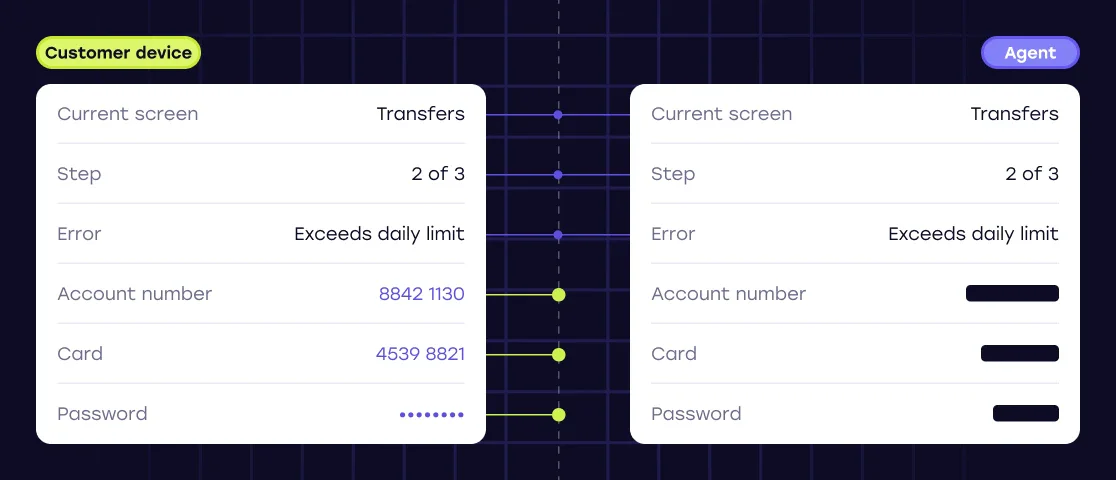
With device-side redaction, information designated as sensitive is removed from the shared experience before permitted session information leaves the customer’s device.
Customer device → sensitive data redacted → permitted context transmitted → agent
This distinction matters. Rather than transmitting sensitive information and hiding it later, Cobrowse can prevent designated information from entering the co-browsing session in the first place.
The agent gets the context needed to help the customer without receiving information they don’t need.
Private by Default: a different approach to privacy
Redaction also raises a bigger question: should everything be visible until an organization decides to hide it, or private until the organization decides to share it?
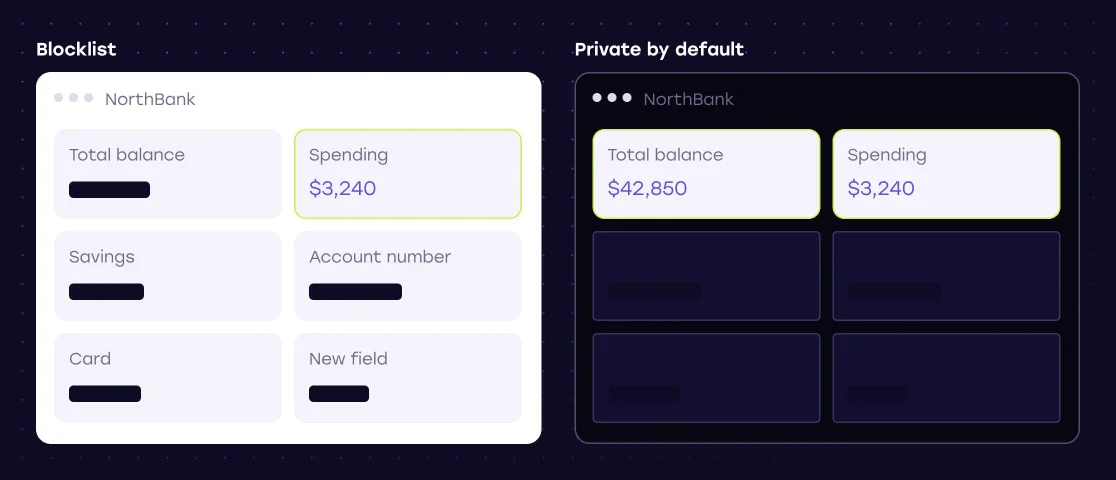
A traditional blocklist model works like this:
Everything visible → identify sensitive information → hide it
Cobrowse’s Private by Default approach reverses that model:
Everything private → explicitly approve permitted information → agent sees what’s allowed
Why does that matter?
Imagine a large banking application with hundreds of screens and multiple development teams continually releasing new features. In a blocklist model, newly introduced sensitive information needs to be identified and configured for redaction.
With Private by Default, new or unconfigured content can remain private until the organization explicitly approves it for sharing.
It changes the security question from:
Have we identified everything that needs to be hidden?
to:
What does this agent actually need to see to help the customer?
For large, frequently changing digital environments, that’s a fundamentally different approach to privacy.
Privacy needs to be configurable
Enterprise applications don’t stand still.
New customer journeys launch. Interfaces change. Regulations evolve. Teams change. New categories of sensitive information appear.
Privacy controls need to evolve with them.
With Cobrowse, authorized teams can centrally manage granular redaction policies without requiring every privacy change to be tied to a new application release.
That means a security or operations team doesn’t necessarily have to wait for:
development → testing → release approval → deployment
just to update which information agents are permitted to see.
Configuration can also go beyond redaction.
Enterprise organizations may need to determine:
- Which pages, screens, or journeys allow co-browsing
- Which information particular agents can see
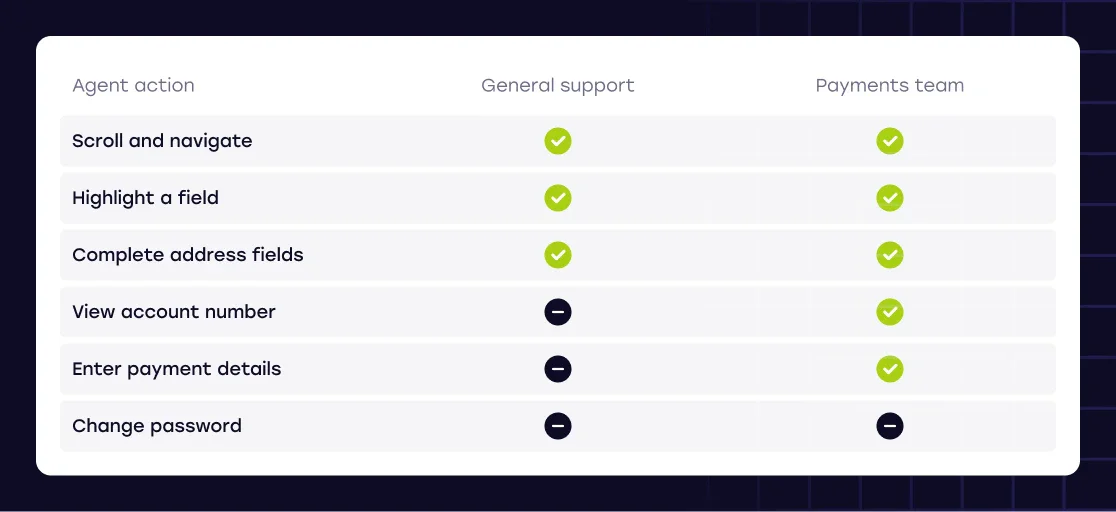
- Which actions agents can perform
- Which teams receive different permissions
- Where co-browsing should be prohibited entirely
Remote interaction, for example, doesn’t have to be all-or-nothing. An agent might be allowed to scroll, navigate, or help complete certain fields while being prevented from interacting with passwords, sensitive controls, or particular actions.
The principle is simple:
Giving an agent permission to help a customer shouldn’t automatically give them permission to see or interact with everything the customer can.
Security should follow customers across web and mobile
Enterprise customer journeys increasingly span websites and native mobile applications.
The sensitivity of customer information doesn’t change when someone moves from a browser to an iPhone or Android app, so the privacy model shouldn’t disappear either.
Cobrowse supports configurable redaction across web and supported native mobile environments, allowing organizations to apply privacy controls to digital experiences across channels.
That’s particularly important for banks, insurers, telecommunications providers, and other enterprises where native mobile applications have become a primary customer-service channel.
Enterprise privacy should follow the customer journey, not stop at the browser.
Deployment and governance are part of the security model
Enterprises can also have very different requirements for where their co-browsing infrastructure runs.
For many organizations, vendor-hosted SaaS is appropriate. Others may require regional hosting, private cloud infrastructure, customer-controlled cloud environments, or fully on-premises deployment.
Cobrowse supports vendor-hosted and customer-controlled deployment models, including self-hosted environments in AWS, Microsoft Azure, and Google Cloud, as well as on-premises configurations.
For organizations with particularly strict requirements, self-hosted configurations can also operate without outbound dependencies on Cobrowse-controlled infrastructure.
That flexibility allows the deployment architecture to follow an organization’s existing security, regulatory, and data-residency requirements.
Governance continues after a session begins. Depending on an organization’s policies, enterprise co-browsing can also provide session history, agent identity, timestamps, consent information, recordings, and programmatic access to session information.
This creates two complementary layers:
Privacy and control during the session.
Accountability after the session.
Secure enterprise co-browsing is a layered model
There isn’t one feature that makes co-browsing secure.
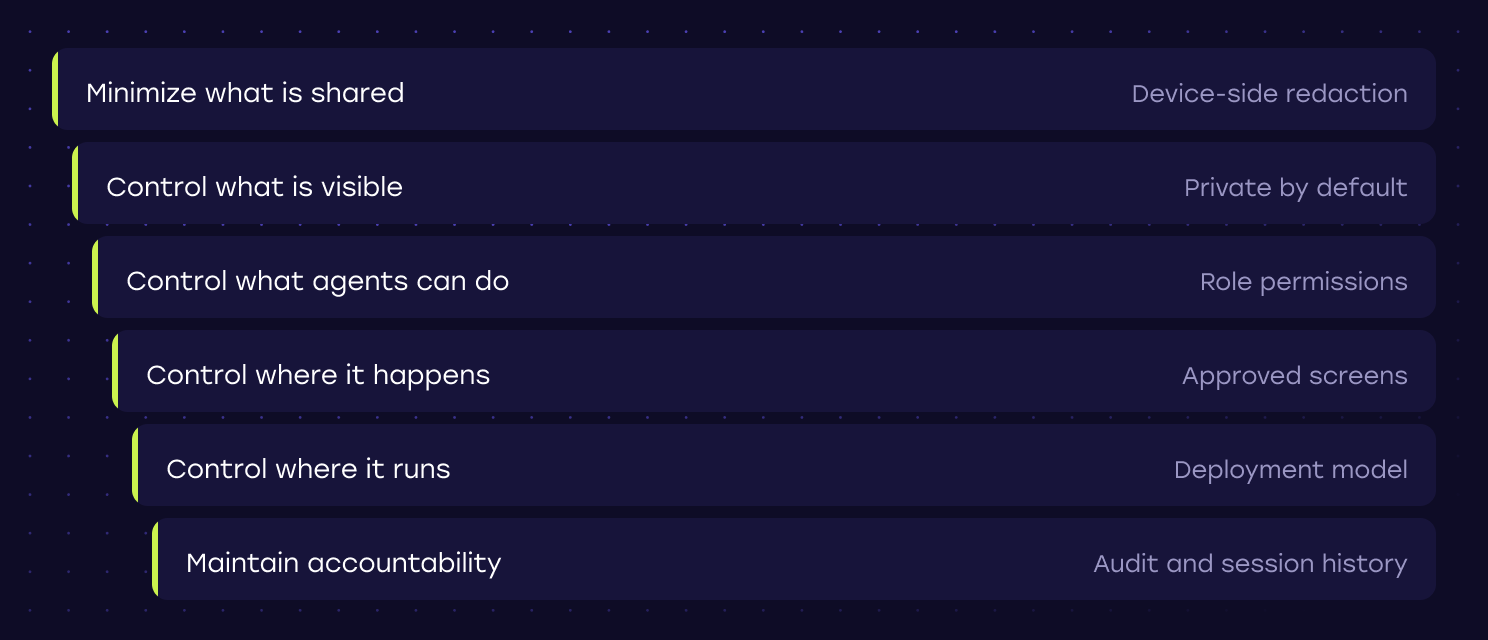
Instead, enterprise security comes from applying controls throughout the interaction:
Minimize what’s shared.
Use device-side redaction to keep unnecessary sensitive information out of the session.
Control what’s visible.
Use granular privacy policies and Private by Default to determine what agents can see.
Control what agents can do.
Apply permissions appropriate to their role and the customer journey.
Control where co-browsing happens.
Restrict co-browsing to approved applications, screens, domains, or journeys.
Control where infrastructure runs.
Choose a deployment model that fits the organization’s security and data requirements.
Maintain accountability.
Preserve appropriate audit and session information.
So rather than simply asking whether a co-browsing platform is secure, enterprises should ask a more useful question:
How much control do we have over information, access, actions, infrastructure, and governance throughout the co-browsing experience?
Secure Co-Browsing FAQ
Is co-browsing secure?
Co-browsing can be designed for highly secure enterprise environments when privacy and access controls are built into the architecture. Secure implementations can combine device-side redaction, Private by Default controls, granular agent permissions, consent, auditing, and flexible deployment to limit unnecessary access to sensitive customer information.
Can co-browsing agents see passwords or payment information?
They don’t need to. Cobrowse can redact designated sensitive information on the customer’s device before permitted session information is transmitted. This allows agents to receive the context needed to assist a customer without seeing protected fields such as passwords, authentication codes, or payment information.
What is device-side redaction?
Device-side redaction removes designated sensitive information from the shared co-browsing experience before permitted session information leaves the customer’s device. This reduces unnecessary exposure because protected information doesn’t need to be transmitted elsewhere and hidden later.
What is Private by Default co-browsing?
Private by Default is Cobrowse’s allowlist-based privacy approach in which content can remain hidden from agents unless explicitly approved for sharing. Instead of identifying everything that needs to be hidden, an enterprise can define what agents actually need to see.
Can co-browsing privacy rules change without an application release?
With Cobrowse, authorized teams can centrally manage granular redaction policies without requiring every change to be tied to a new application release. This allows privacy configuration to evolve as applications, policies, and organizational requirements change.
Can different agents have different co-browsing permissions?
Yes. Enterprise co-browsing can use granular controls to determine what different agents or teams can see and do. Organizations can control visibility as well as interaction capabilities such as clicking, scrolling, typing, and navigating.
Can secure co-browsing work in native mobile apps?
Yes. Cobrowse supports configurable privacy and redaction controls across supported web and native mobile environments, allowing enterprises to extend their co-browsing security model into iOS and Android customer experiences.
Can secure co-browsing be self-hosted?
Yes. Cobrowse supports customer-controlled cloud and on-premises deployments in addition to hosted options. This gives organizations with specific infrastructure, security, or data-residency requirements greater control over where their co-browsing environment operates.
Protect sensitive data by sharing less of it
The strongest approach to co-browsing security isn’t figuring out how to protect sensitive customer information after it has already been shared.
It’s reducing how much sensitive information needs to be shared in the first place.
Device-side redaction, Private by Default, configurable privacy policies, granular agent permissions, deployment flexibility, and auditability all support that principle.
An agent should receive the context required to help a customer—and no more than they need.
For enterprises handling sensitive customer information, that philosophy is central to how Cobrowse approaches secure co-browsing.